



Description
Download Free Mouse Auto Clicker – mouse auto clicker, free auto clicker, automated clicking tool, productivity tool, mouse click automation
Overview
Free Mouse Auto Clicker is a productivity-focused tool designed to automate repetitive mouse click tasks on Windows systems. The application targets users engaged in activities requiring frequent, manual clicking—such as data entry, online gaming, testing software interfaces, or repetitive UI interactions. By eliminating the need for constant manual input, the software aims to reduce user fatigue and increase efficiency. Its primary function is to simulate mouse clicks at user-defined intervals, allowing users to focus on higher-level tasks. The tool is particularly beneficial for professionals, testers, and casual users who perform repetitive actions across various digital environments. Although the developer, Mouse Auto Clicker, did not provide additional background details, the app’s design and functionality suggest a focus on simplicity and utility. The app operates as a lightweight desktop utility, integrating seamlessly into daily workflows without demanding high system resources. Given its free pricing model, it serves as an accessible solution for users seeking automation without financial investment. In the broader context of productivity tools, Free Mouse Auto Clicker fills a niche for minimalistic, no-frills automation, offering a straightforward alternative to more complex scripting or macro tools.
Key Features & Functionality
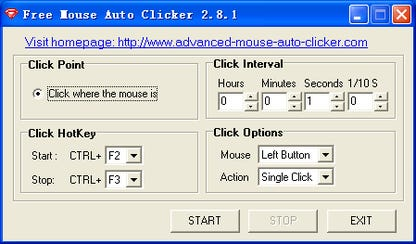
- Simple, intuitive interface – The application features a clean, minimalist design that prioritizes usability. Even users with limited technical experience can quickly grasp the controls and begin automating clicks without a learning curve.
- Support for left and right mouse buttons – Users can configure the tool to automate either left-clicks, right-clicks, or both, enabling flexibility across different software environments and use cases.
- Customizable click intervals – The ability to set precise timing between clicks allows users to match automation speed to specific tasks, whether fast-paced gaming actions or slower, deliberate interactions.
- Start and stop hotkeys – Dedicated keyboard shortcuts enable users to launch or halt the auto-clicking process instantly, reducing reliance on mouse navigation and improving workflow continuity.
- Cursor-based clicking – The tool activates clicks at the current mouse cursor position, eliminating the need to input exact screen coordinates. This feature enhances flexibility, especially when interacting with dynamic or changing UI elements.
For example, a user testing a mobile app’s interface could use the tool to simulate repeated taps on a button, while a data entry specialist might use it to automate form submissions. The combination of hotkey control and cursor targeting makes it ideal for both static and dynamic workflows, offering practical value in real-world scenarios.
Interface, UX & Performance
The user interface of Free Mouse Auto Clicker is designed with minimalism in mind, focusing on essential controls without visual clutter. Navigation is straightforward, with clearly labeled buttons and settings accessible through a single window. The layout is consistent and predictable, reducing cognitive load during use. Although the developer did not list formal performance metrics, the app’s lightweight footprint of 2.4 MB suggests it operates efficiently with minimal impact on system resources. The tool runs in the background with low CPU and memory usage, making it suitable for use on older or less powerful machines. Responsiveness is maintained during operation, with minimal lag between hotkey activation and click execution. Stability appears reliable based on the app’s simple functionality, though real-world crash reports or long-term behavior were not disclosed. The lack of visual effects or animations contributes to a smooth, distraction-free experience. Overall, the UX is optimized for task completion rather than aesthetic appeal, aligning with the app’s core purpose as a utility tool. Users can expect consistent behavior across different screen resolutions and input devices, though specific compatibility details were not provided.
Platform Compatibility & Technical Requirements
Free Mouse Auto Clicker is designed for the Windows operating system. The app is available in version 1.0 and has a file size of 2.4 MB, indicating a compact and lightweight installation. The developer did not specify minimum OS requirements or hardware specifications, so compatibility with older Windows versions (such as Windows 7 or 8) cannot be confirmed. Similarly, no details were provided regarding processor architecture or RAM requirements. The app does not appear to require administrative privileges, as it functions as a standard desktop utility. However, users should ensure their system supports mouse input automation, which is typically available on standard Windows configurations. For users seeking to install or update the app, the latest version is accessible through official distribution channels. The absence of platform-specific details does not detract from its usability but suggests users should exercise caution when deploying it on non-standard or restricted environments.
Pros and Cons
Pros
- Completely free to download and use
- Minimal system resource consumption
- Simple interface suitable for beginners
- Supports both left and right mouse clicks
- Customizable click timing for precise control
- Hotkey activation for quick start/stop
- Clicks at cursor position without coordinate input
Cons
- Developer did not provide technical specifications or system requirements
- Only available for Windows, with no information on cross-platform support
- No built-in logging or recording features for automation sessions
- Limited customization options beyond click type and interval
- No official update notifications or changelog visibility
FAQ
Is Free Mouse Auto Clicker safe to download and install?
Yes, the app is free and designed for Windows. As with any third-party tool, users should download it from trusted sources to ensure it is not bundled with unwanted software.
Can I use this tool for gaming?
Yes, the auto-click functionality may assist in certain repetitive gaming actions, though users should verify compliance with game terms of service to avoid penalties.
Does the app require admin rights to run?
The developer did not specify whether administrative privileges are required. The app is likely designed to run without elevated permissions, given its lightweight nature.
Is there a mobile version available?
No information was provided about a mobile or iOS version. The app is currently confirmed for Windows only.
How do I stop the auto-clicking process?
You can stop the automation using the predefined stop hotkey, which is set during configuration. This allows for immediate interruption without navigating through menus.
Final Thoughts
Free Mouse Auto Clicker delivers a focused, no-nonsense solution for users seeking to automate repetitive mouse clicks. Its simplicity, low resource usage, and free access make it a compelling choice for anyone dealing with monotonous digital tasks. While it lacks advanced features like recording or scripting, its core functionality is reliable and well-executed. The tool is especially valuable for professionals in testing, data entry, or casual users looking to streamline routine actions. Despite limited technical documentation, the app performs consistently within its intended scope. For those in need of a lightweight, effective automation helper, Free Mouse Auto Clicker offers real value. Download Free Mouse Auto Clicker now.
Guides & Tutorials for Free Mouse Auto Clicker
How to install Free Mouse Auto Clicker
- Click the Preview / Download button above.
- Once redirected, accept the terms and click Install.
- Wait for the Free Mouse Auto Clicker download to finish on your device.
How to use Free Mouse Auto Clicker
This software is primarily used for its core features described above. Open the app after installation to explore its capabilities.
User Reviews for Free Mouse Auto Clicker 0
No reviews found


